Using Mapping Tools in osu! lazer
osu! lazer has a different beatmap editing workflow from osu! stable. Mapping Tools can edit beatmap files from either client. In lazer, use its external editing workflow and be aware that some features have limitations.
How to use Mapping Tools in osu! lazer
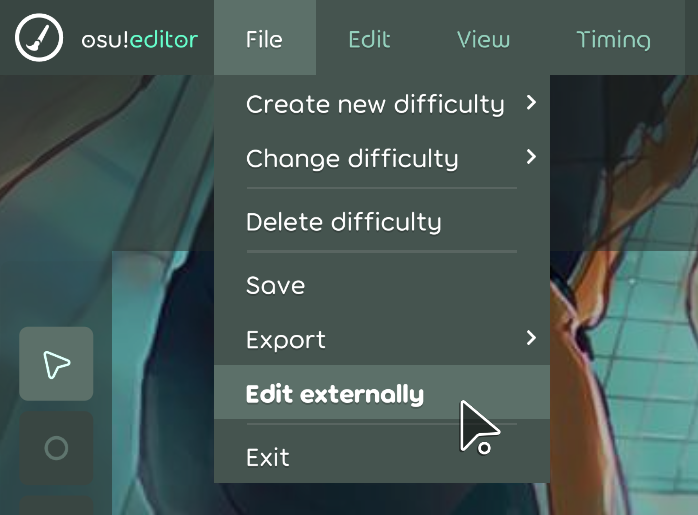
In the osu! lazer editor, click File > Edit externally. This will create a temporary folder with all the files of the beatmap set you are currently editing. Mapping Tools will automatically detect this folder and set it as the selected beatmap. Once you're done editing with Mapping Tools you can click Finish editing and import changes and osu! lazer will import the changes.
Compatibility
Not all features of Mapping Tools work in osu! lazer. This section attempts to list the compatibility of all Mapping Tools features.
Any features that use Editor Reader will not work in osu! lazer, so it is recommended to go to the Preferences and disable Editor Reader if you plan on only using osu! lazer.
General
- ❌ Anything Open current beatmap does not work
- ❌ Anything Current editor time does not work
- ❌ Anything Selected hit objects does not work
- ✅ Generate backup works
- ✅ Load backup works
- ✅ Slider paths with multiple segment types are fully supported
Tools
- ❌ Geometry Dashboard does not work. Relies on editor reader.
- ✅ Hitsound Copier works
- 🔶 Hitsound Studio works, but references to imported samples and beatmaps break after the temp folder is removed.
- ✅ Pattern Gallery works
- ✅ Property Transformer works
- ✅ Sliderator works, but is extremely laggy in lazer editor
- ✅ Tumour Generator 2 works
- 🔶 Auto-fail Detector works, but auto-fail does not exist in Lazer.
- ✅ Combo Colour Studio works
- ✅ Hitsound Preview Helper works
- ✅ Map Cleaner works
- ✅ Mapset Merger works
- ✅ Metadata Manager works
- ✅ Rhythm Guide works
- ✅ Slider Completionator works
- ✅ Slider Merger works
- 🔶 Slider Picturator works, but the picture slider does not show up in Lazer.
- ✅ Timing Copier works
- ✅ Timing Helper works
Heads up about continued lazer compatibility
As osu! lazer is actively in development, it's file format and client are likely to change and that can cause Mapping Tools to break. If you run into any issues using Mapping Tools on lazer that is not on this list, report an issue with About > Report an issue.